
media

Welcome to your smooth-skin journey.

Get started

Step 1

Download the
Braun IPL app.

apple-icon
apple-icon

Step 2

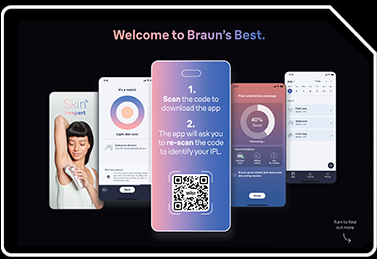
Open the app. Once requested, scan the QR code from the Welcome Card to identify your device.
Step 3

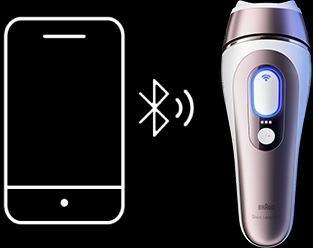
Turn on the Bluetooth to pair your IPL with the App. Follow the App setup steps and start your IPL sessions!
Need help?

You have some questions concerning one of our products? We are here to help you.

Go to help center
Electric Shavers
  • Series 9 Pro
  • Series 8
  • Series 7
  • Series 6
  • Series 5
  • Series 3
  • Replacement Parts
Stylers & Trimmers
  • Beard Trimmer
  • All-in-One Trimmer
  • Body Groomer
  • Series X
  • Hair Clippers
  • Ear and Nose Trimmer
Epilators
  • Silk·épil SkinSpa
  • Silk·épil 9 flex
  • Silk·épil 9
  • Silk·épil 7
  • Silk·épil 5
  • Silk·épil 3
IPL
  • Skin i·expert
  • Silk·expert Pro 5
  • Silk·expert Mini
Other Products
  • Face Spa
  • Body Mini Trimmer
  • Face Mini Hair Remover
  • Lady Shaver
Tips & Tutorials
  • Face Shaving Tips
  • Beard Care
  • Facial Hairstyles
  • Facial Hairstyles
  • Body Grooming
  • Sensitive Skin
  • Hair Removal
  • Skin Care Tips
  • Exfoliation
About Braun
  • Design & Craftsmanship
  • Durability
  • Braun Timeline
  • Braun designers
  • History
  • Megabrands
  • Products and brand
Help & Account
  • Customer Service
  • Contact us
  • Careers
Legal
  • Privacy Policy
  • Terms & Conditions Website
  • Accessibility Statement
  • My Data
  • Imprint
  • Sitemap
Other P&G brands
  • Gillette
  • Gillette Venus
  • Oral-B
  • Old Spice
twitterfacebookyoutube

© 2026 Procter & Gamble

Cookie Consent